Convert a Workout Spreadsheet Into a Tracker App (Without Retyping Every Set)
3 min read
Spreadsheets are where training programs live. Coaches write them there, famous programs get shared as Google Sheets, and half the lifters you know have a sheet with their name on a tab. The problem is never the spreadsheet. The problem is the gym: thumbing between cells with a barbell waiting is nobody's idea of a good session.
So at some point you decide to move the program into a tracker app. Then you discover the dirty secret of workout apps: almost none of them will take your spreadsheet.
Why apps will not import your spreadsheet
Every spreadsheet is shaped differently. Days across the top or down the side, sets and reps in one cell or five, percentages, supersets, notes in the margins. Building an importer that reads all of that used to be somewhere between hard and impossible, so app makers skipped it and built exercise pickers instead.
That leaves the standard answer everywhere: rebuild the program by hand. Create a routine, search the exercise list, add each movement, type each set and rep scheme, repeat for every day of every week. For a real program, a two or three month plan with different weeks, that is an evening of data entry, and every quirk your program has gets sanded off by whatever the app's routine editor happens to support.
What about CSV import?
If you go looking for "import excel workout plan" you will find mostly dead ends. Hevy imports workout history in Strong's CSV export format only, which does not create a routine you can follow and does not accept your sheet's shape. Strong exports its own data but cannot re-import it, let alone yours. Boostcamp offers a big library of ready-made programs but no way to bring in your own sheet. A couple of small tools ask you to reformat your spreadsheet into their column layout first, which is the data entry you were trying to avoid, moved into a different grid.
The 20-second version: screenshot the sheet
RepSheet skips the format problem entirely. Instead of asking your spreadsheet to be shaped a certain way, it reads a screenshot of it the way a person would: days, exercises, sets, reps, week by week. You screenshot the sheet, upload it, and about twenty seconds later the whole program is a trackable plan.
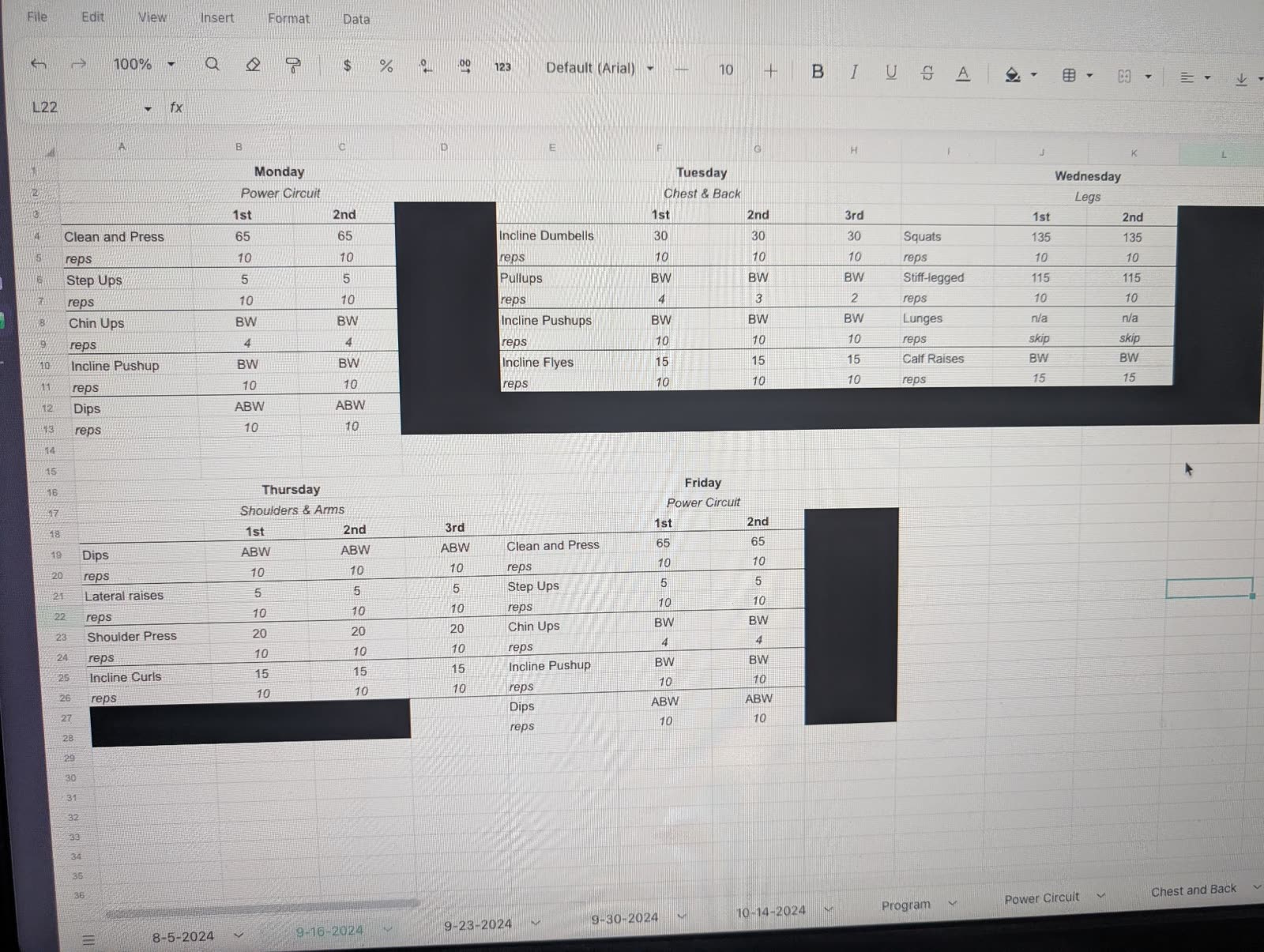
That screenshot is not a friendly example. It is a photo of a spreadsheet on someone else's screen, complete with glare and redaction bars, and it still comes out the other side as a full week of training, ready to log set by set.
It works the same on a PDF, a text from your coach, or a photo of a handwritten page, because the point is not spreadsheet support. The point is that whatever form your program arrives in, tracking it should not cost you an evening.
What you keep and what you gain
Converting the sheet does not mean abandoning it. Your coach's original stays the source of truth; you are just moving the logging to a place built for it. What you gain is everything a sheet is bad at: a rest timer, your last session's numbers next to this one, history per exercise, and a view of whether your lifts are actually moving over the weeks.
RepSheet is $10 a month or $40 a year. Bring the ugliest sheet you have to repsheet.fit and see what it makes of it.
